


Tired of manually changing the dates on your website every year? Then I've got just the thing for you.
With a simple 4 lines of PHP code, WordPress automatically sets the current year. Provided that your server's time is set correctly. However, I would assume that this is the case.
2 easy steps for automatically updated year
1a. Add this code to your functions.php (my recommendation)
The best way to do this is to use a Child themewhich I have described in more detail in this blog post.
1b. Insert this code with the plugin code snippet
If you are not so familiar with the WordPres folder structure and PHP, you can also implement this code risk-free via code snippets. However, I strongly recommend that you implement it using method 1a in the child theme. Nevertheless, I would like to show you a possible alternative.
To do this, install the Code Snippets plugin and create a new snippet with the above code.
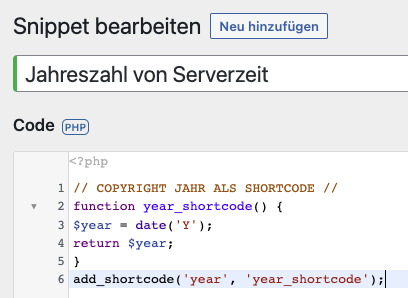
The practical thing about the plugin is that you cannot „destroy“ your site with it. The plugin checks whether it causes an error when the code is activated. If so, the code will not be activated.
2. enter 2026 as the year
Then you just have to insert the shortcode "year" in the square brackets, which reads out the year of the server time or date, into the text instead of the manual year.

Conclusion: The year will now update automatically
This is how you can save yourself an annoying, annual ritual with four lines of code – especially if you maintain multiple websites. I recommend you implement it with variant 1a. If you don't use a child theme yet, check out my blog post about it. That's also very easy and quick to do.
 Deutsch
  English
0 Comments