

Dynamic Email Sending in Breakdance Forms
Send messages directly to the right department – simply by selecting the appropriate field in the form. With Breakdance and a little trick, you can set this up in no time at all. Since version 2.4, Breakdance offers action-level conditions – meaning you can define whether actions like webhooks, custom JavaScript, form submissions, or emails should be executed based on specific conditions. Sounds perfect for dynamic email routing, right? Almost! These conditions apply only to whether an action runs – not how it runs. That means you can’t say: “Send this email to recipient X if the user selects Y.” But don’t worry – here’s a quick and elegant solution to do just that.
The Solution: Control Recipients via Field Values
Instead of creating multiple conditional email actions, there’s a more elegant and streamlined approach: Pass the recipient email address directly via a form field.
Step-by-Step Guide
I’ll assume you already know how to create a form in Breakdance – so let’s get right into setting up dynamic email recipients:
1. Define Field Values in a Select, Radio or Checkbox Field
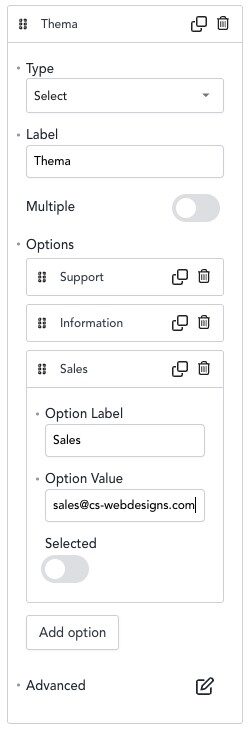
In my example, I use a selection field (Select). However, the trick also works with radio buttons or checkboxes. Go to the field that is to determine the email recipients and enter the name of the selection option (e.g., Sales) in the Option Label field and the email address to which the email is to be sent (in my case, sales@cs-webdesigns.com) in the Option Value field:
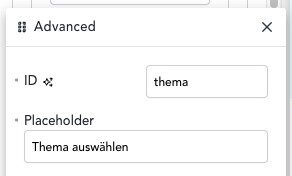
Advanced einen sinnvollen ID-Namen vergeben:
2. Set up email action with dynamic recipient
Add a new email action under Actions and enter the field ID in braces in the recipient field (To Email):
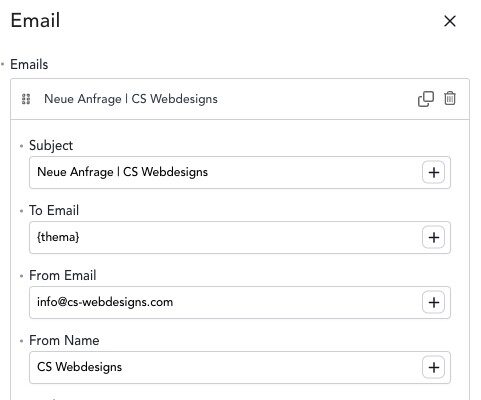
That's all there is to it. Your requests are now sent dynamically to your desired recipients.
Conclusion
With this little trick, you can easily send dynamic emails in Breakdance depending on the user's choice - without PHP, hooks or JavaScript. Ideal for contact forms with multiple points of contact such as support, sales or general inquiries.
0 Comments