


Update as of 07/23/2026: Breakdance forms can now be tracked in Independent Analytics
Since version 2.15 (released on July 22, 2026), it supports Independent Analytics Pro The tracking of breakdance forms. It is now possible to activate tracking directly in the settings of the respective form.
To do this, open your form in the Breakdance Builder and activate „Independent Analytics Pro“ in the actions:
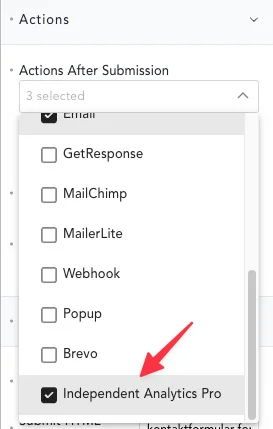
Once you have submitted a form, these will be displayed in the Independent Analytics Dashboard.
The workaround described so far is therefore no longer necessary.
Independent Analytics Unfortunately, (IAWP) does not (yet) offer integration for tracking Breakdance forms.
However, this can be retrofitted relatively easily with a single global PHP snippet: it works for all forms on the entire website and every form submission appears in IAWP with a clean, clearly defined name. The solution is also completely JavaScript-independent.
How does it work?
Breakdance processes all form submissions on the server side via the WordPress AJAX system - specifically via the action breakdance_form_custom. We hook into exactly this hook and then fire the Independent Analytics tracking hook iawp_custom_form_submissions. No detour via the browser, no custom event - directly on the server side.
Requirements
- Independent Analytics Pro (Form Tracking is a Pro function)
- Breakdance Builder
- A snippet plugin such as WPCodeBox or Code Snippets
Step-by-Step Guide
I assume that you already know how to create forms in Breakdance - so let's get straight to the implementation.
Depending on how many forms you have on your website, the implementation will differ.
A form on the website
If you only have one form on your website – for example, on your contact page or as a global block for various locations, but technically it's always the same form – this very simple snippet will suffice.
Place the following in your code snippets plugin (e.g., Fluent Snippets, Code Snippets) PHP snippet to:
 add_action('wp_ajax_breakdance_form_custom', 'iawp_track_breakdance_form', 5);
add_action('wp_ajax_nopriv_breakdance_form_custom', 'iawp_track_breakdance_form', 5);

function iawp_track_breakdance_form() {
    $form_id   = isset($_POST['form_id']) ? intval($_POST['form_id']) : 1;
    $form_name = 'Kontaktformular'; // Name der im IAWP Dashboard erscheint

    do_action('iawp_custom_form_submissions', $form_id, $form_name);
}
Here you only need to $form_name to the desired label, which should appear in the Independent Analytics Dashboard.
As a configuration in the code snippet plugin, I would choose the following.
- How to execute: Always (on page load)
- Hook: plugins_loaded
- Where: Everywhere
If you've saved it like that, you just need to fill out and submit your form so you can activate it in IAWP under Forms in the dashboard. Do that just to be safe. Incognito mode, because you have probably disabled tracking in IAWP for logged-in users. You can find more about this below under „3. Testing“.
Multiple forms on the website
If you are using multiple forms, we need the form ID in the codeform_id) and the page (post_id,) on which the form is placed, identify and create a combination from it. This is how we create a unique unique_form_id and enable IAWP to display form submissions separately in the dashboard.
1. Determine form ID and post ID
To correctly map a form, you therefore need two values that Breakdance automatically submits with every submit:
form_id- the ID of the form element in Breakdancepost_id- the ID of the page on which the form is located
This is how you find them out:
- Open the page with the form in the browser
- Open the developer tools (F12) → Tab Network
- Filter to Fetch/XHR
- Submit the form
- Click on the
admin-ajax.phpRequest → Payload form_idandpost_id

Important: If the same form element is used on multiple pages (e.g., because it was duplicated during creation), it will still have the same form_id, but a different post_id and thus a different combination for unique identification in IAWP.
You do that for every single form and note down the IDs.
2. Create PHP snippet
Place the following in your snippet plugin (e.g., Fluent Snippets, Code Snippets) PHP snippet to:
add_action('wp_ajax_breakdance_form_custom', 'iawp_track_breakdance_form', 5);
add_action('wp_ajax_nopriv_breakdance_form_custom', 'iawp_track_breakdance_form', 5);

function iawp_track_breakdance_form() {
$form_id = isset($_POST['form_id']) ? intval($_POST['form_id']) : 1;
$post_id = isset($_POST['post_id']) ? intval($_POST['post_id']) : 0;

$form_names = [
'xxx_yy' => 'Form 1', // x is your form ID, y is your post ID and in the '' enter the name that should appear in IAWP
'xxx_yy' => 'Form 2',
'xxx_yy' => 'Form 3',
// add further forms here
];

$key = $form_id . '_' . $post_id;
$form_name = isset($form_names[$key]) ? $form_names[$key] : 'Breakdance Form ' . $key;
$unique_form_id = $form_id * 100000 + $post_id;

do_action('iawp_custom_form_submissions', $unique_form_id, $form_name);
}
Priority 5 ensures that our code runs before Breakdance without interrupting its own processing.
The important part here is this one:
$form_names = [ 'xxx_yy' => 'Form 1', 'xxx_yy' => 'Form 2', 'xxx_yy' => 'Form 3', // add more forms by simply adding more forms here];
The ‚xxx_yy‘ is unique_form_id and becomes out of the form_id and post_id calculated.
Here again with the following settings:
- How to execute: Always (on page load)
- Hook: plugins_loaded
- Where: Everywhere
Example of a customer project:

3. Testing
Independent Analytics does not track logged-in users by default. Therefore, always test in the private browser tab or incognito mode (depending on the browser, it's called something different, but it's the same thing) or (temporarily!) activate tracking for logged-in users in the Independent Analytics settings.
After the first successful submission, the form appears under Form Tracking.
As soon as Independent Analytics one form submission tracked has, you can use the Activate the respective form in the dashboard settings:

Then the form submissions appear in IAWP, in this example I have activated them in the site metrics:

Conclusion
Thanks to the AJAX architecture, we don't need JavaScript or HTML attributes – a single PHP snippet is enough to cleanly track any number of forms in Independent Analytics. New forms can be added at any time with one line of code.
 Deutsch
  English
0 Comments